 RSS
RSS Twitter
 Facebook
Showing posts with label Microsoft. Show all posts
Apple × Bing × Entertainmen × Giants × Google × Microsoft

It is all Entertainment; all major search engines realized that more than 10% of all Internet search queries are related to entertainment. So, why not create a separate channel for entertainment and music lovers. In June, Microsoft launched a separate vertical for entertainment search queries and integrated in Bing and promoted results for Zune.
Google is also working on something similar and planning to build a music download service of its own.
Both Google and Bing provide links to stream full songs found in search results, but Bing provides additional details on lyrics and buy links. After launching this service, Google will integrate this service to its search engine and music searches on Google will link to full song streams provided by MySpace Music, as well as Twitter updates. This search giant still leads the pack with around 70% of market share for searches in US but when it comes to music, it is none other than Apple, which commands 70% of digital music download sales in the United States. This is the reason why both Microsoft and Google are trying to compete with Apple through their mobile platforms.
Gaming × Giants × Kinect × Microsoft × SDK × Xbox 360
Microsoft has finally released an SDK for Kinect Windows development. It's not as though folks weren't already doing such development, but it's now "legit."
Indeed, when folks started re-purposing Microsoft's Xbox 360 motion-based controller, Microsoft wasn't too pleased. In fact, the company called it hacking.

“Microsoft does not condone the modification of its products. With Kinect, Microsoft built in numerous hardware and software safeguards designed to reduce the chances of product tampering. Microsoft will continue to make advances in these types of safeguards and work closely with law enforcement and product safety groups to keep Kinect tamper-resistant.”We're not sure when or how, but somehow a light bulb went off in someone's head, and Microsoft realized this was a good thing. Some examples of past "hacks" were controlling World of Warcraft and teaching American Sign Language. One bad idea was a sex game.
Indeed, when folks started re-purposing Microsoft's Xbox 360
motion-based controller, Microsoft wasn't too pleased. In fact, the company called it hacking.
“Microsoft does not condone the modification of its products. With Kinect, Microsoft built in numerous hardware and software safeguards designed to reduce the chances of product tampering. Microsoft will continue to make advances in these types of safeguards and work closely with law enforcement and product safety groups to keep Kinect tamper-resistant.”We're not sure when or how, but somehow a light bulb went off in someone's head, and Microsoft realized this was a good thing. Some examples of past "hacks" were controlling World of Warcraft and teaching American Sign Language. One bad idea was a sex game.
Reade More @ Tech-Ex.net
Giants × Microsoft × Nokia × Samsung
 |
| Nokia CEO |
I can't see Microsoft acquiring Nokia and making their own device, so Samsung is the perfect match for the company. Im quite surprised HTC havent thought about putting together a syndicate.
Gaming × Giants × Kinect Star Wars × Microsoft
If I were younger and less jaded in my ways, I have to concede that I would find Kinect Star Wars utterly enthralling. After all, this game is all about putting the player in the shoes of a Jedi, and this has been a childhood dream of pretty much every bloke I've ever met who was young enough to enjoy the films when they were first released.
I have to start this preview, however, by making a confession: I am not the type of player Kinect Star Wars is aimed at, the reason being that I am one of those curmudgeonly souls whose love of the Star Wars franchise was obliterated by the prequels. For me, any defence of nearly every Star Wars IP released after The Phantom Menace can be stopped dead in its tracks by uttering the words, "Jar Jar Binks". So the fact that Kinect Star Wars is set during the same time period as the prequel movies was something I had to put to one side for my hands-on preview of the game.
The demo began with a brief tutorial courtesy of Yoda, who was inaudible over the din at the showcase event. Thankfully, a Microsoft representative was on hand to yell over the noise if I got into any trouble and both he and Yoda took me through the game's easy control scheme. Players wield a lightsaber by making cutting and thrusting motions with their right hand. They can also use it to deflect laser beams shot at them from oncoming foes. Their left hand allows them to use The Force to lift enemies into the air and knock them over. They can also use their feet to kick opponents down, provided they're close enough. Finally, by leaning forward, players can make their Jedi sprint across environments.
Read Full at guardian.co.uk [ image: guardian.co.uk ]
I have to start this preview, however, by making a confession: I am not the type of player Kinect Star Wars is aimed at, the reason being that I am one of those curmudgeonly souls whose love of the Star Wars franchise was obliterated by the prequels. For me, any defence of nearly every Star Wars IP released after The Phantom Menace can be stopped dead in its tracks by uttering the words, "Jar Jar Binks". So the fact that Kinect Star Wars is set during the same time period as the prequel movies was something I had to put to one side for my hands-on preview of the game.
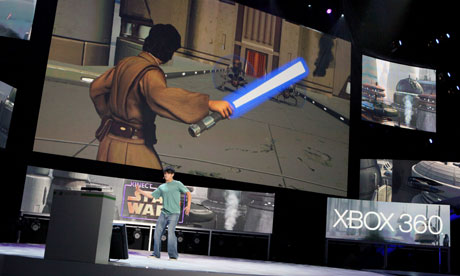 |
| Sweeping and chopping motions with their right hand allow players to wield a lightsabre - albeit with a slightly irksome delay. Photograph: Casey Rodgers/AP |
The demo began with a brief tutorial courtesy of Yoda, who was inaudible over the din at the showcase event. Thankfully, a Microsoft representative was on hand to yell over the noise if I got into any trouble and both he and Yoda took me through the game's easy control scheme. Players wield a lightsaber by making cutting and thrusting motions with their right hand. They can also use it to deflect laser beams shot at them from oncoming foes. Their left hand allows them to use The Force to lift enemies into the air and knock them over. They can also use their feet to kick opponents down, provided they're close enough. Finally, by leaning forward, players can make their Jedi sprint across environments.
Read Full at guardian.co.uk [ image: guardian.co.uk ]
games × Gaming × Gears of war 3 × Giants × Microsoft
As promised, Microsoft has aired the first single-player campaign trailer for Gears of War 3. It aired, as expected, at the end of the Champions League final between Barcelona and Manchester United (won by Barcelona).
This first full trailer opens by basically re-hashing the earlier released teaser trailer featuring protagonist Marcus Fenix and his father Adam. The new trailer goes on to show action between COG (Coalition of Ordered Governments) and Locust forces, as well as the new enemy variant, the Lambent (mutated members of the Locust).


Special musical guest for the trailer is Black Sabbath performing “War Pigs.”
In addition to the new enemy, for the first time in the series, Gears of War multiplayer will feature four-player co-op gameplay. Gears of War 3 will be the final game in the current story arc.
Pre-orders are available here. The game will be shipped in Standard, Epic, and Limited editions, and ships on Sept. 20th.
Watch the trailer below.
Watch the trailer below.
Microsoft × Shortcut Keys × Windows × Windows 7
Hello Friends when I’m work on my System (Microsoft Windows Installed) I want to do work Quick as much, So I think to Share these Windows 7 Shortcut Keys with my Readers.
Desktop
- Win + Up – Maximize the current Window
- Win + Down – Restore down or minimize current Windows
- Win + Leftdow – Dock the current Window to the left half of the screen
- Win + Rightdow – Dock the current Window to the right half of the screen
- Win + Number – Activate and run the program pinned on Windows 7 Taskbar, running program won’t be affected
- Win + Home – Minimize all but the current Window
- Win + Space – Makes all Windows transparent so you can see through to the desktop
- Win + Pause or Break – Open System Properties
- Win + Tab – Flip Aero 3D [press Tab to cycle between Windows]
- Win + B – Move focus to notification tray (the right-most portion of the taskbar)
- Win + D – Show/Hide desktop
- Win + E – Windows Explorer is launched
- Win + F – Search
- Win + G – Bring all gadgets on top and foreground
- Win + L – Lock Computer
- Win + M – Minimize all Windows
- Win + P – Open the projection menu (generally used for laptops connected to projectors)
- Win + R – Run Command is launched.
- Win + S – OneNote Screen Clipping Tool
- Win + T – Show preview thumbnail of running applications in Windows Taskbar one by one without mouse over
- Win + X – Mobility Center
- Win + # – Quicklaunch
- Win + = – Magnifier
- Win + + or - – Enables the magnifier and zooms in/out
- Win + Shift + Up – Maximize vertical size
- Win + Shift + Down – Restore vertical size
- Win + Shift + Leftdow – Jump to left monitor
- Win + Shift + Right – Jump to right monitor
- Win + Shift + M – Undo all Window minimization
- Win + Shift + T – Cycles backwards
- Win + Ctrl + F – Opens the Active Directory Find Computers dialog
- Ctrl + Right – Move the cursor to the beginning of the next word
- Ctrl + Left – Move the cursor to the beginning of the previous word
- Ctrl + Up – Move the cursor to the beginning of the previous paragraph
- Ctrl + Down – Move the cursor to the beginning of the next paragraph
- Ctrl + Click – A pinned taskbar icon to cycle through the program’s open Windows (e.g. IE)
- Ctrl + Win + Tab – Persistent flip 3D
- Ctrl + Shift with an arrow key – Select a block of text
- Ctrl + arrow + Spacebar – Select multiple individual items in a Window or on the desktop
- Ctrl + Shift + Esc – Open Task Manager directly
- Ctrl + Shift + N – Create new folder
Shortcuts for Ease of Access
- Right Shift for eight seconds – Turn Filter Keys on and off
- Left Alt+left Shift+PRINTSCREEN (or PRTSCRN) – Turn High Contrast on or off
- Left Alt+left Shift+NUMLOCK – Turn Mouse Keys on or off
- Shift five times – Turn Sticky Keys on or off
- NUMLOCK for five seconds – Open the Ease of Access Center
- Win + U – Cycle through all open Window
Windows Explorer
- Alt + Leftdow – Go back
- Alt + Right – Go forward
- Alt + Up – Go up a directory
- Alt + Enter – Open the Properties Window of the current selection
- Alt + Spacebar – Open the shortcut menu for the active Window
- Alt + F4 – Close the active Window
- Alt + Tab – Switch to previous active Window
- Alt + Esc – Cycle through all open Windows
- Alt + D – Move focus to address bar
- Alt + P – Show/hide the preview panel
- Ctrl + N – Open a new Window
- Ctrl + Mousewheel – Change the view type (extra large, small, list view, detail, etc.)
- NUMLOCK + Asterisk (*) on numeric keypad – Display all subfolders under the selected folder
- NUMLOCK + Plus Sign (+) on numeric keypad – Display the contents of the selected folder
- NUMLOCK + Minus Sign (+) on numeric keypad – Collapse the selected folder
Taskbar Modifiers
- Shift + Click on icon – Open a new instance
- Middle click on icon – Open a new instance
- Ctrl + Shift + Click on icon – Open a new instance with Admin privileges
Dialog Box
- Ctrl + Tab – Move forward through tabs
- Ctrl + Shift + Tab – Move back through tabs
- Shift + Tab – Move back through options
- Tab – Move forward through options
- Alt + underlined letter – Perform the command (or select the option) that goes with that letter
- Enter – Replaces clicking the mouse for many selected commands
- Spacebar – Select or clear the check box if the active option is a check box
- Arrow keys – Select a button if the active option is a group of option buttons
- BackSpace – Open a folder one level up if a folder is selected in the Save As or Open dialog box
Photo Gallery
- Ctrl + F – Open the Fix pane
- Ctrl + P – Print the selected picture
- Ctrl + I – Open or close the Details pane
- Ctrl + . – Rotate the picture clockwise
- Ctrl + , – Rotate the picture counter-clockwise
- Ctrl + Mouse scroll wheel – Change the size of the picture thumbnail
- Ctrl + B – Best fit
- Ctrl + E – Search for an item
- Alt + Leftdow – Go back
- Alt + Right – Go forward
- + – Zoom in or resize the picture thumbnail
- - – Zoom out or resize the picture thumbnail
- Shift + Delete – Permanently delete the selected item
- Enter – View the selected picture at a larger size
Logging In/ Out
- Win + Right + Enter – Shutdown
- Win + Right + Right + R – Restart
- Win + Right + Right + S – Sleep
- Win + Right + Right + W – Switch users
Enjoy..!!
If you Like Share it and Comments Below….
Microsoft × WGA × What is × Windows × Windows Genuine Advantage
Windows Genuine Advantage(WGA) Notifications is a software created by Microsoft as part of its effort to reduce Windows software piracy. WGA Notifications once installed helps you to confirm that the copy of Windows installed on you machine is genuine and properly licensed.

If your copy of Windows is not genuine then Windows Genuine Advantage Notifications software provides you with periodic notifications and remainders to help you take appropriate action and protect yourself from security risks posed by counterfeit software.
Read More at Genuine Microsoft software program privacy statement
Microsoft × Windows × Windows 8 × Windows Phone
Windows 8 for desktop computers and tablets will ship in 2012, and an upcoming Windows Phone 7 update will include 500 new features, Microsoft Chief Executive Steve Ballmer said Monday at a developers conference in Japan.
Ballmer said that Japan is home to Microsoft’s second-largest subsidiary and that Microsoft is looking to Japan to help the company be competitive in areas where it “is committed to investing and innovating and leading.”
One of the areas Microsoft wants to lead is “natural user interface” — using speech, gestures and touch to control computers. Microsoft has had success with its Kinect motion-sensing camera for its Xbox 360 video game console, but it has yet to release a major consumer tablet offering, which would rely on a touch-screen-oriented version of Windows. Read full News at L.A. Times [image: la times]
One of the areas Microsoft wants to lead is “natural user interface” — using speech, gestures and touch to control computers. Microsoft has had success with its Kinect motion-sensing camera for its Xbox 360 video game console, but it has yet to release a major consumer tablet offering, which would rely on a touch-screen-oriented version of Windows. Read full News at L.A. Times [image: la times]
Apple × Microsoft × Nokia
“Three days back a Russian blogger proposed that Microsoft will be buying Nokia’s mobile division for approx. $40 billion. You can find that here eldarmurtazin and a background information of this man, reveals he often makes speculations and they are came out to be true in past also.”
But the issue is why microsoft is buying Nokia and that too when it just concluded a deal with it. The answer came to us when watch the current gadget and software market and then triangulate that with microsoft position. Microsoft had become czar of traditional desktop OS. But due to coming of high performance mobile processors and netbooks, and partly its negligence to this market, microsoft is going to be next yahoo.
Read More at http://ennovates.com